AI Virtual Try On for Clothes: How It Works and Why Fashion Brands Use It
Learn how AI virtual try on for clothes works, which garments it handles best, and how fashion brands use it to cut photoshoot costs and lower return rates.
On this page
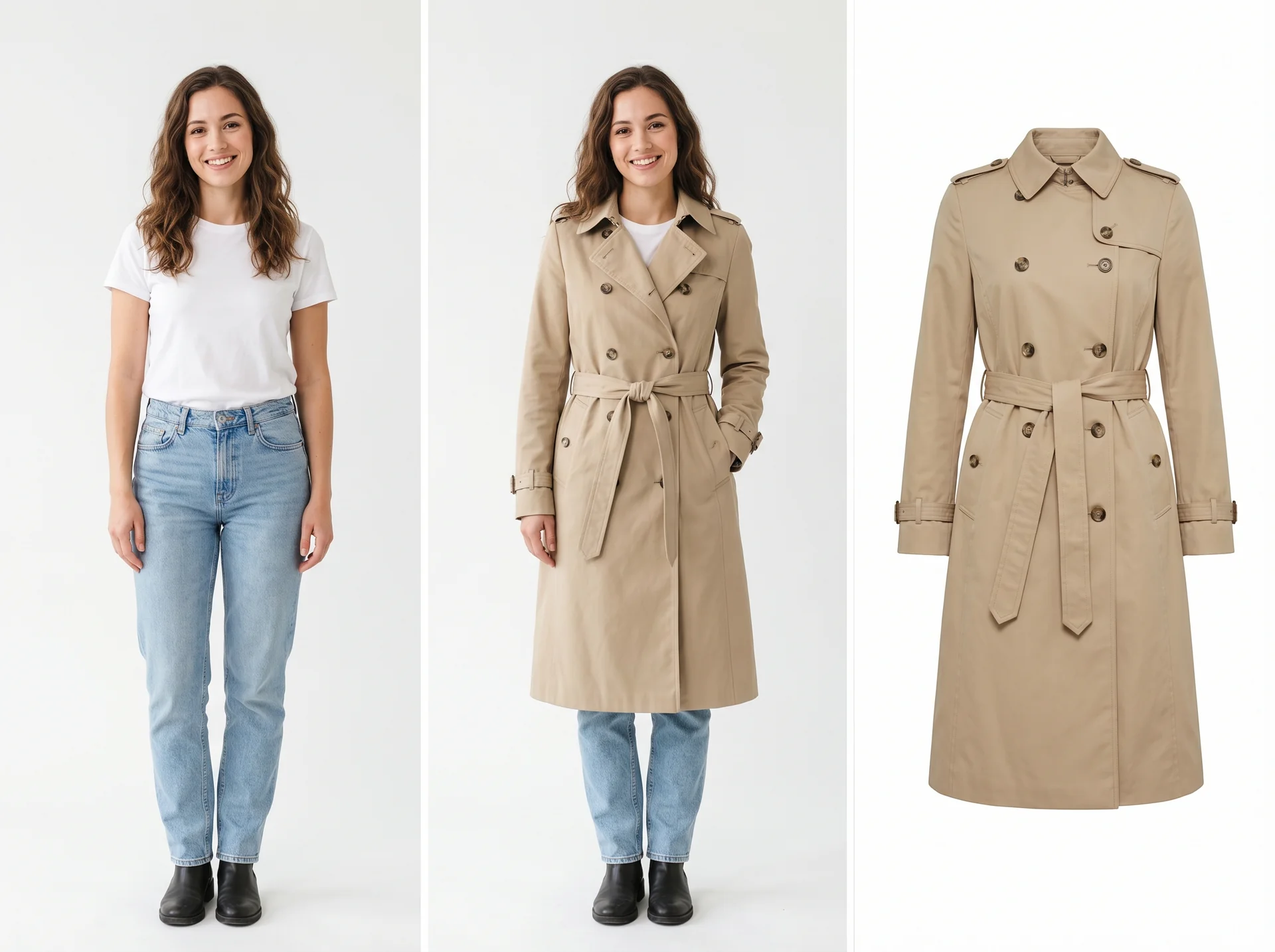
AI virtual try on for clothes lets shoppers and brands see how a garment looks on a person without a physical fitting or a traditional photoshoot. For fashion ecommerce, it turns a model photo and a garment image into a realistic on-model preview in minutes.
In this guide, you will learn how the technology works, which clothing categories it suits best, how it compares to studio photography, when it is not the right choice, and how to start using it for your own store.
What is AI virtual try on for clothes?
AI virtual try on for clothes is an image-generation workflow that places a garment onto a person photo. Instead of photographing every SKU on a model, you upload a flat lay, packshot, or ghost-mannequin image plus a model photo, and the AI renders the item as if it were being worn.
The result is a static image or short visual that shows fit, drape, and styling. It is used for two main jobs:
-
Shopper previews — customers upload a photo of themselves to see how an item might look before buying.
-
Ecommerce content production — brands generate on-model product-page images, catalog shots, and ad creatives without booking a studio.
Unlike simple image overlays, modern virtual try-on models analyze body shape, pose, and garment structure so the fabric folds, shadows, and proportions look natural.
How does AI virtual try on work?
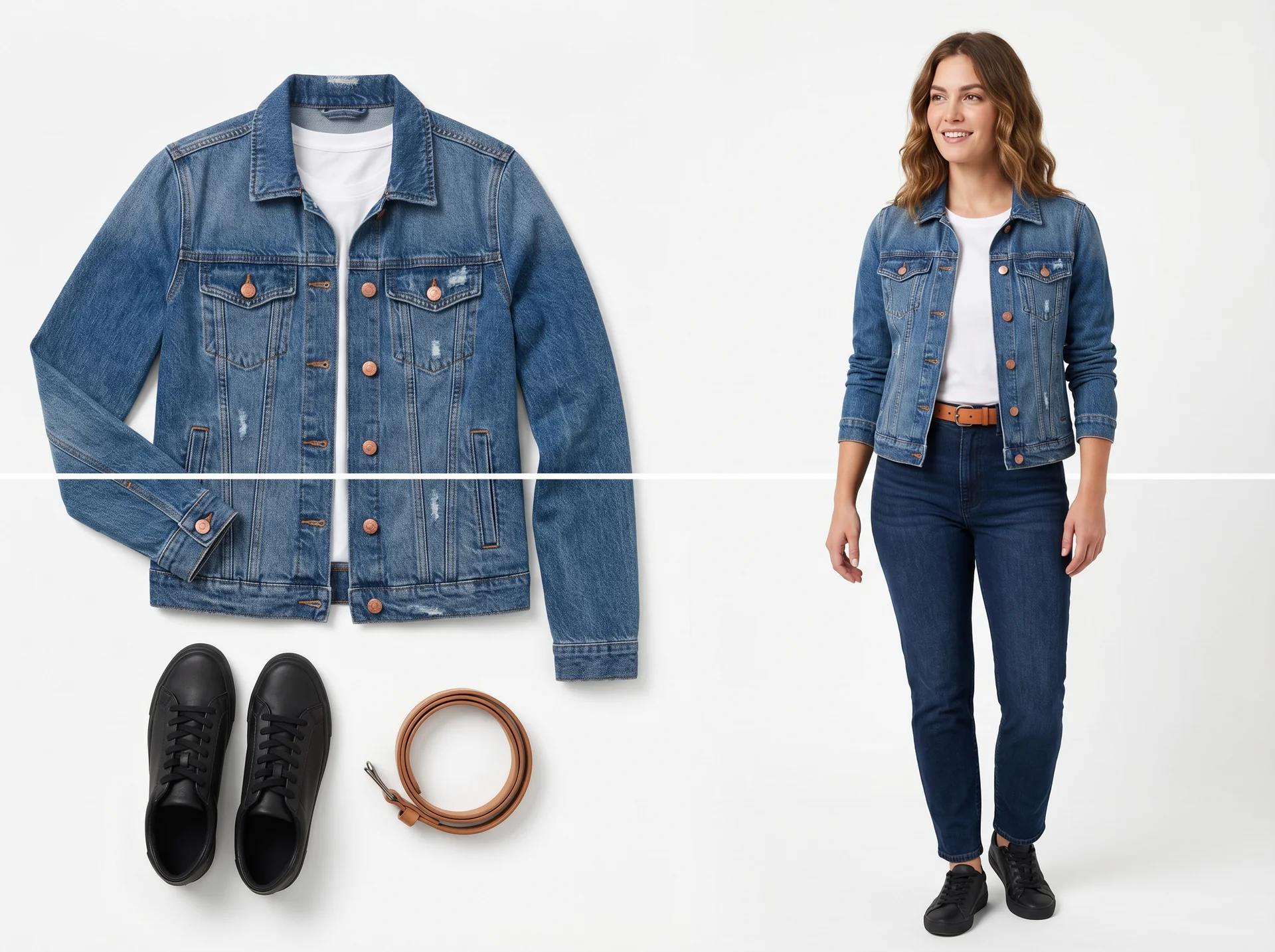
Most clothing try-on tools follow the same four steps:
-
Upload the inputs. You provide a person photo and a garment image. The garment image can be a flat lay, mannequin shot, or clean product photo.
-
Describe the result. A short prompt tells the AI what to do — for example, "put the jacket from image 2 on the model in image 1, keep the background neutral."
-
Body and garment analysis. The AI detects body landmarks, segments the garment, and estimates how the fabric should drape over the pose.
-
Rendering. A diffusion or neural-rendering model composites the garment onto the body with consistent lighting, shadows, and texture.
Under the hood, the process blends computer vision and generative AI. The model first separates the person from the background and maps key body points such as shoulders, elbows, waist, and hips. It then analyzes the garment's shape, color, pattern, and texture so it can predict how the fabric would fall and fold when worn. Finally, a generative model synthesizes a new image that keeps the person's pose and setting while replacing or adding the clothing item.
Advanced systems also let you change the model, background, or pose, so one garment can produce many campaign-ready variants. Some tools even support video output, though image-based generation remains the most common format for ecommerce.
The best results come from tools that preserve garment identity. A strong virtual try-on workflow keeps the original item's color, pattern, and structure recognizable instead of inventing a similar-looking replacement. This matters for brands that need accurate merchandise representation.
Why do fashion brands use virtual try on?
The main reasons brands adopt AI virtual try on are speed, cost, and content variety.
Lower photoshoot costs. A traditional on-model ecommerce shoot can cost anywhere from a few hundred to several thousand dollars per day when you include studio, photographer, model, styling, and retouching. AI-generated on-model images often cost a fraction of that per image, which matters for brands with large catalogs or frequent drops.
Faster time to market. A studio shoot can take days or weeks from booking to final assets. Virtual try-on generation usually finishes in seconds to minutes, so seasonal drops and marketplace launches can move faster.
More variants per SKU. One garment can be shown on different models, in different settings, and for different channels without reshooting. This is useful for A/B testing ad creative, localizing imagery, and serving multiple marketplaces.
Inclusive representation. Because models can be swapped without extra cost, brands can show the same item on a wider range of body types, skin tones, and ages than a single shoot budget might allow.
For a broader look at AI-generated product imagery, see AI product photography.
Which clothing categories work best with virtual try on?
Not every garment renders equally well. Based on current tools and common use cases, structured items tend to produce the most reliable results:
-
Tops and shirts — t-shirts, blouses, sweaters, and jackets usually keep their shape well.
-
Dresses and skirts — a-line, bodycon, midi, and maxi dresses are widely supported.
-
Outerwear — coats, blazers, and structured jackets work because the fabric holds a clear silhouette.
-
Footwear and accessories — shoes, bags, glasses, and jewelry are often handled by related try-on workflows.
Categories that are harder to render accurately include sheer fabrics, loose drape, heavy embellishments, and complex layering. In those cases, a generated preview is best treated as a directional visual rather than an exact fit guarantee.
Accessories sit in a slightly different workflow. Jewelry, watches, and glasses usually require close-up placement on hands, ears, or faces, which is why many platforms handle them as a separate try-on type. If you sell jewelry, a dedicated virtual jewelry try-on workflow may be more appropriate than a full-body clothing generator.
How does virtual try on compare to a traditional photoshoot?
FactorTraditional photoshootAI virtual try onSetup timeDays to weeksMinutesPer-image costOften $50–$500+ for on-model shotsOften under $1–$5Model diversityLimited by budgetMultiple models, poses, and backgroundsReshootsRebook crew and studioRegenerate instantlyBest forHero campaigns, editorial, complex stylingCatalog volume, PDP images, fast tests
Most brands do not fully replace the studio. They use virtual try on for high-volume catalog work and reserve traditional shoots for hero imagery and brand campaigns.
Can virtual try on reduce online clothing returns?
Return reduction is one of the most cited business benefits. Fashion ecommerce return rates are typically high, and many returns come from fit or appearance not matching expectations.
Studies and vendor reports from 2025–2026 cite return-rate reductions in the 20–40% range for apparel retailers using virtual try-on or AR fitting tools, with some individual merchants reporting larger improvements on fit-sensitive categories. A 2025 Forrester analysis cited an average return-rate reduction of about 23% across apparel, reaching up to 40% for specific product types.
Virtual try on helps by letting customers preview silhouette, length, and styling before checkout. It should still be paired with size charts, fit guidance, and clear product details — it complements, rather than replaces, sizing information.
Sources: Forrester analysis via Antla, Shopify AR try-on report, StyTrix 2026 AI virtual try-on overview
What are the limitations of AI virtual try on?
Virtual try on is a production tool, not a magic fitting room. Knowing its limits keeps expectations realistic.
Fit is not guaranteed. The AI can show how a garment might look, but it cannot reliably predict exact sizing for every body. Size charts and return policies still matter.
Complex garments need more care. Dresses with trains, oversized silhouettes, transparent fabrics, and intricate embroidery may need manual review or traditional photography for final hero shots.
Input quality matters. A blurry person photo or a low-resolution garment image will produce weaker results than clean, well-lit inputs.
Brand consistency requires oversight. While AI speeds up output, color accuracy, logo placement, and styling details should still be checked before publishing.
Legal and disclosure questions are still evolving. Some retailers label AI-generated model imagery so customers know what they are looking at. If you plan to publish generated images widely, check your marketplace's policies and regional guidance on AI-generated product visuals.
How can you start using virtual try on for your store?
Getting started is usually straightforward:
-
Prepare clean garment images. Flat lays, ghost mannequins, or simple packshots work best.
-
Choose your model photos. Use a diverse set of poses and body types that match your audience.
-
Generate and review. Run a small batch first, check fit accuracy, lighting, and brand consistency, then iterate on prompts or inputs.
-
Publish to PDPs, ads, and marketplaces. Use the approved outputs where they match the channel's image requirements.
If you want to test it directly, DeepKolor's virtual try-on tool lets you upload a model photo and a garment image and generate a clothing preview in minutes.
Frequently asked questions
What is AI virtual try on for clothes?
It is an AI workflow that combines a person photo with a garment image to generate a realistic preview of how the clothing looks when worn.
How does AI virtual try on work?
The AI detects body landmarks, segments the garment, estimates fabric drape, and renders a new image with consistent lighting and shadows.
Which clothing categories work best?
Structured garments like shirts, dresses, jackets, and coats usually render most reliably. Sheer, loose, or heavily embellished items are more variable.
Can virtual try on reduce returns?
Yes. Retailers commonly report return-rate reductions of 20–40% when shoppers can preview fit and style before buying, though results vary by category.
Is AI virtual try on accurate enough to replace size charts?
No. It helps shoppers judge appearance and styling, but size charts and fit guidance are still needed for precise sizing.
How does virtual try on compare to a photoshoot in cost?
Virtual try on is usually much cheaper per image and faster to produce, especially for catalog volume. Traditional shoots still win for hero campaigns and complex styling.
What makes a good input image for virtual try on?
Good inputs are well-lit, in focus, and show the garment or body clearly. Plain backgrounds for garment photos and visible body shape in model photos usually produce the best results.
Related posts
How to Make a Risograph-Style Poster Without a Printer
The riso look comes from paper, two inks, halftone plates, and whitespace acting as one system. What risograph posters are, why they are trending in 2026, and how DeepKolor's mono-print-poster skill generates one from a single prompt.
What Is an AI Design Agent? Definition and How It Works
An AI design agent takes a brief, creates the visual, and edits with you in chat. See how it differs from image generators and when to use one.
AI Jewelry Product Photography: How to Create Ecommerce Images That Sell
Learn how to create AI jewelry product photography for rings, necklaces, and bracelets — from one clean source photo to ecommerce-ready images, plus accuracy limits and marketplace image rules.